See project risks before deployment
Run one local command from your Mule project root. No Anypoint credentials, no platform access, and no JavaScript knowledge required.
Let your coding agent set it up
Paste this into Codex, Claude Code, GitHub Copilot, Gemini, Cursor, or another coding agent:
Fetch and follow https://raw.githubusercontent.com/Avinava/mule-lint/master/docs/agent-setup.md
to set up or update mule-lint in this Mule repository. Detect the agent host and existing
configuration, run a read-only baseline scan, preview any proposed changes, preserve customized
files, and do not modify Mule source or commit unless I approve it.
The agent setup runbook covers a first scan, safe host detection, MCP, shared configuration, CI, and validation. It does not ask the agent to change Mule source during setup.
npm install -g @sfdxy/mule-lint
cd path/to/your-mule-project
mule-lint . --profile recommended
Node.js is only the runtime used to start mule-lint. If you work mainly in Anypoint Studio and Maven, think of it like installing a command-line utility: you do not need to write Node code.
MuleSoft developer
Scan before committing, read findings by file and line, and open an HTML report when you want the full project picture.
Common recipes →Team lead
Adopt a reviewed profile, tune deliberate exceptions, and add a quality gate after the team has reviewed the baseline.
Profiles and rollout →Platform or CI engineer
Produce SARIF for pull-request annotations and use exit codes for a reliable pipeline decision.
Quality gates →AI-assisted developer
Expose local lint, formatting, and API contract tools to Codex, Claude, VS Code, or another MCP client.
MCP setup →One report, two ways to work
The terminal output is quickest while fixing a file. The HTML report is better for exploring severity, rule categories, project metrics, and the complete suggested fix.
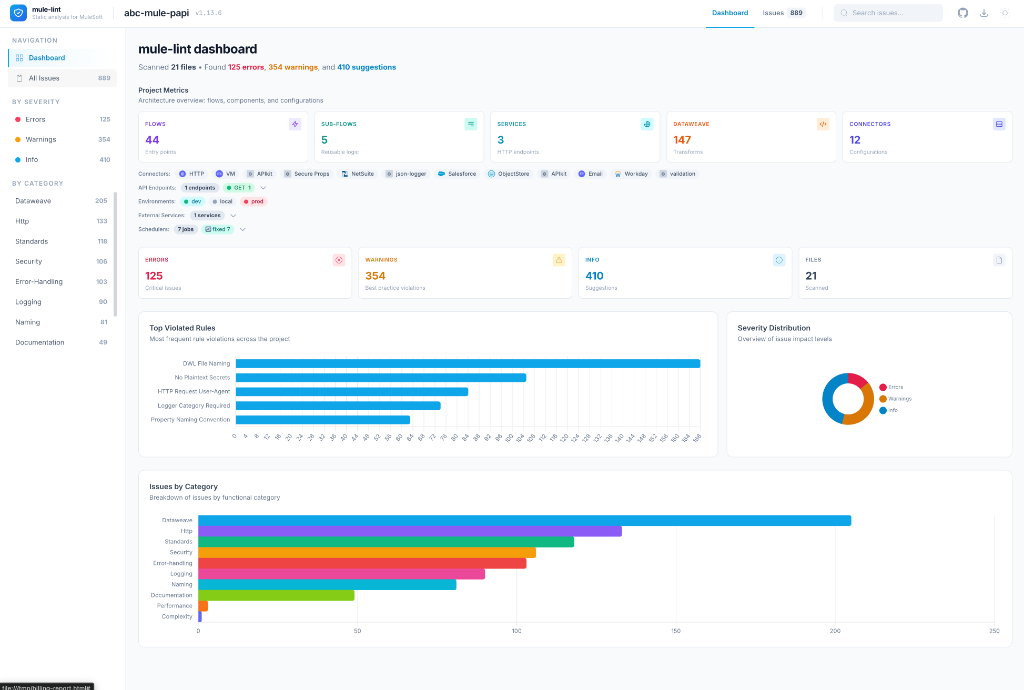
Every screenshot and output example comes from the repository’s sample Orders System API. It contains no customer names, endpoints, identifiers, credentials, or business logic.
What gets checked
- Mule XML: flows, error handlers, connectors, logging, naming, and cross-file references
- DataWeave: maintainability, duplication, and compatibility patterns
- YAML: environment coverage, property naming, and plaintext secrets
- Project structure: Maven setup, common folders, and source-control hygiene
- RAML and OpenAPI: a separate
api validatecommand for contract conformance
The full standards catalog explains the engineering outcomes. The rules catalog documents the executable checks.
A safe first workflow
- Run
mule-lint . --profile recommendedlocally. - Fix errors that apply to your project.
- Review warnings with the team; configure only deliberate exceptions.
- Generate HTML for a shared view.
- Add CI enforcement after the baseline is understood.
Not sure what a message means? Start with troubleshooting, then use the rule ID to find its entry in the rules catalog.