Output formats
Choose an output for the person or system consuming the result. The rules and findings do not change with the format.
| Format | Option | Best for |
|---|---|---|
| Terminal table | --format table |
Local developer work |
| HTML | --format html |
Visual review and sharing |
| SARIF | --format sarif |
Pull-request and editor annotations |
| Report JSON | --format report-json |
Versioned execution and finding contract |
| JSON | --format json |
Scripts and integrations |
| CSV | --format csv |
Spreadsheet review |
| Markdown | --format markdown |
Pull-request comments, job summaries |
| GitHub | --format github |
Inline annotations in GitHub Actions |
| JUnit XML | --format junit |
Generic CI test-report viewers |
Only the report is written to standard output. Quality-gate results, --verbose details, and the
"Report written to" message go to standard error, so --format json | jq and piped SARIF stay valid.
An unknown --format stops with exit code 2 before the scan runs.
Terminal table
mule-lint . --profile recommended
Mule-Lint Report
Scanned 3 files in 46ms

src/main/mule/orders-api.xml
  31:5  error  Flow "get-order-by-id-flow" is missing an error handler (MULE-003)

Project Structure
  0:0   warning  Missing environment properties file for "qa" (YAML-001)

Summary:
  Errors:    1
  Warnings:  10
  Infos:     9
Add --quiet to print only errors.
HTML
mule-lint . --profile recommended --format html --output mule-lint-report.html
Open HTML reports in Chrome 111+, Safari 16.4+, or Firefox 128+. Scripts, styles, fonts and charts are embedded, so the report works offline. The HTML browser requirement is separate from the CLI Node.js requirement.
The report provides:
- project metrics and quality ratings;
- charts for severity, categories, and frequently violated rules;
- an issue table with search and column filters;
- a complete issue-detail panel when you select a row;
- CSV export and light/dark themes.
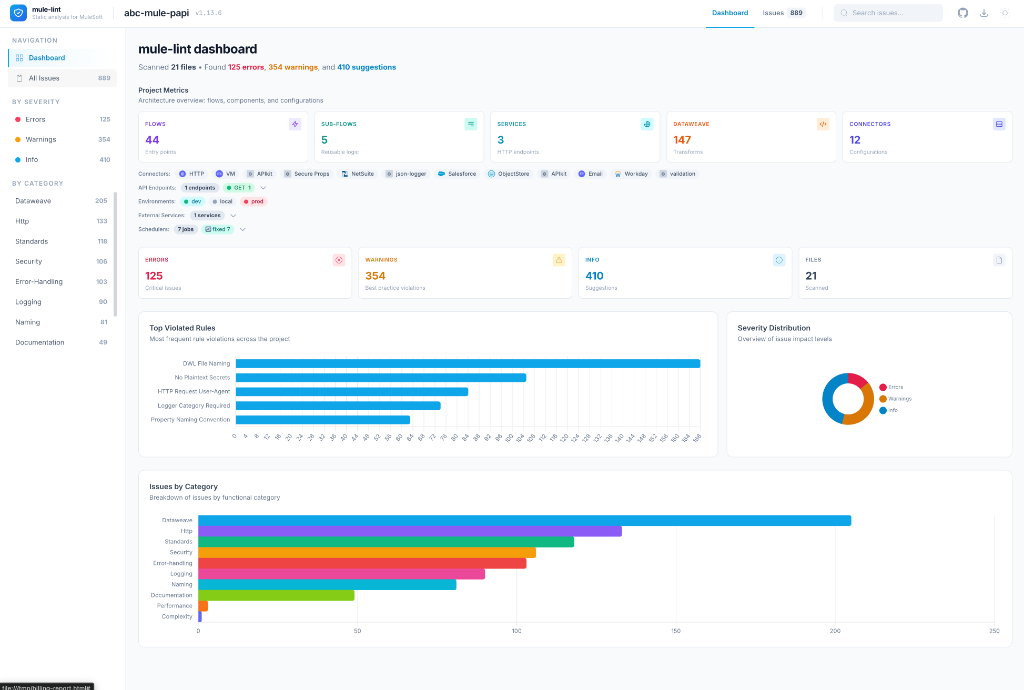
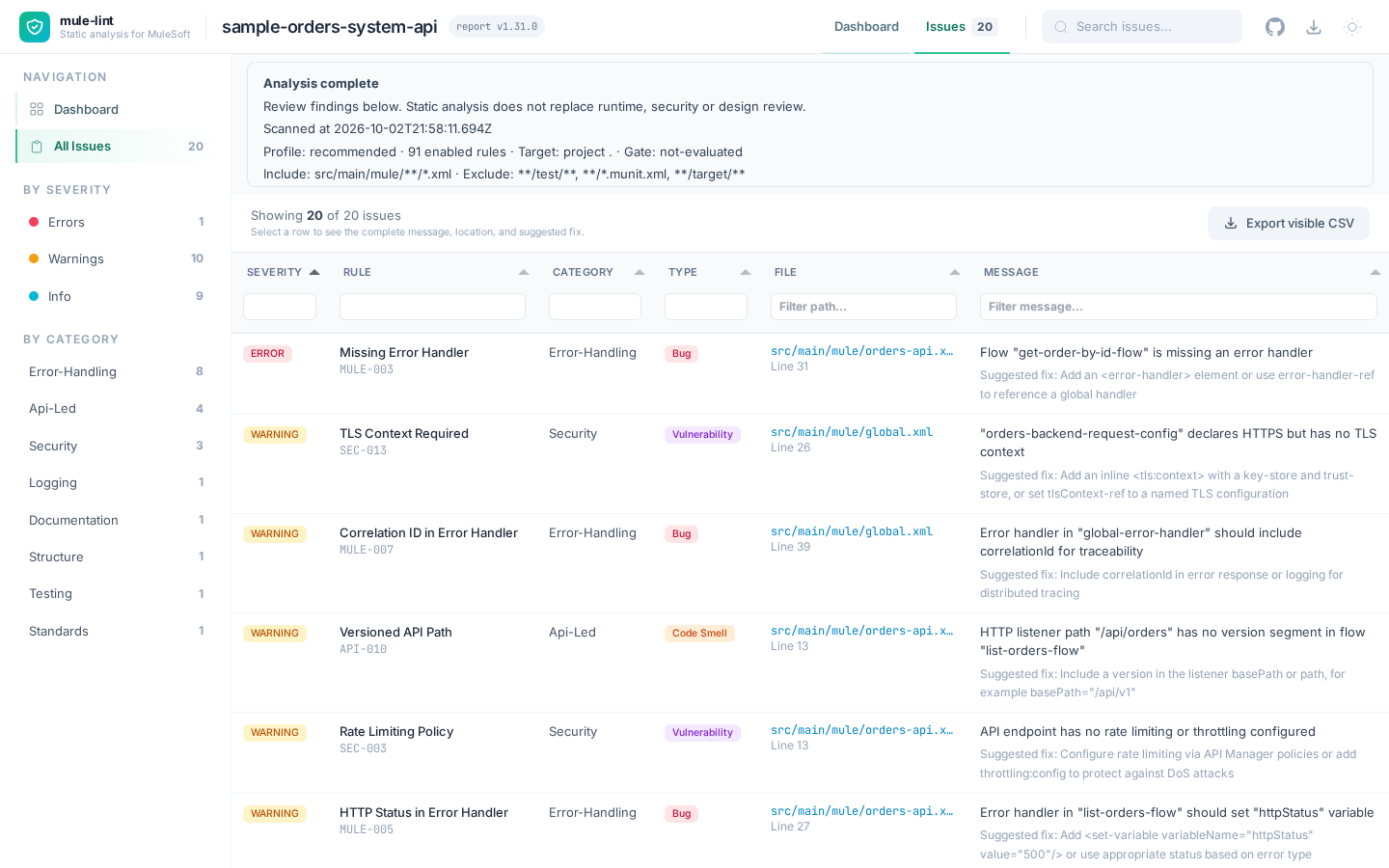
The report embeds its data, typed client, styling, charts, table code and fonts in one HTML file. Open it locally without network access; report loading makes no HTTP(S) requests. Documentation links open only when selected. This offline behavior is an unreleased addition; reports generated by older installed releases may still require CDN access.
--format html without --output writes report.html in the current directory. Missing output directories are created. Files that fail to parse appear in the issue table as PARSE-ERROR.
JSON
JSON is a flat array with one object per finding:
mule-lint . --profile recommended --format json --output mule-lint-report.json
[
  {
    "filePath": "/home/dev/orders-api/src/main/mule/orders-api.xml",
    "relativePath": "src/main/mule/orders-api.xml",
    "line": 32,
    "column": 5,
    "message": "Flow \"get-order-by-id-flow\" is missing an error handler",
    "ruleId": "MULE-003",
    "severity": "error"
  }
]
filePath is absolute and relativePath is relative to the scanned project. Entries can also carry suggestion and codeSnippet. Do not expect a top-level summary object in this format.
Versioned report JSON
mule-lint . --profile recommended --format report-json --output analysis.json
Use report-json for automation that must distinguish an empty finding list from an
unsuccessful analysis. It returns a versioned object; --format json remains the compatible
flat issue array, and the library's formatJsonFull retains its existing shape.
Version 1 contains:
schemaVersion: 1andtool.name/tool.version;execution.status:complete,incomplete(parse or rule failures), orno-files, plus typedexecution.diagnostics;scan: timestamp, duration, effective profile, enabled rule IDs, include/exclude patterns, and the file or project target relative to the project root.scopeKnown: falsemeans an older library caller did not provide scope; empty arrays then mean unknown, not fully checked.target: nullmeans the target was not recorded. A null profile means no named profile was recorded;selection: quiet mode and baseline counts when applied;gate:not-evaluated,passed,warning, orfailed;summaryand deterministically orderedfindings, including parse-error findings.
Each finding contains severity, rule ID, message, muleLint/v1 fingerprint, duplicate
occurrence, and an explicit file or project location. Project findings have no synthetic
line zero. Available catalog standards, documentation links, and remediation are included;
confidence and evidence are not invented. Fingerprints retain the existing rule/path/message
identity (line shifts do not change them); occurrence distinguishes duplicates within a report.
Summary finding counts reflect the current selection. Execution diagnostics cannot be hidden
by quiet mode, a baseline, or permissive gate thresholds.
Library consumers can import reportSchema and createReportContract from @sfdxy/mule-lint.
Validate the version before consuming the object; version 1 may gain additive fields.
Check execution status before interpreting findings or gate results. A complete scan means
its selected analysis finished, not that the whole system is secure or correct.
Baseline: report only new issues
Save a JSON report once, then pass it back to see only what changed:
mule-lint . --profile recommended --format json --output baseline.json
mule-lint . --profile recommended --baseline baseline.json
Issues are matched by rule, file, and message, so moving code up or down a file does not make an
old issue look new. The command prints Baseline: N new, N unchanged, N fixed to standard error.
The report and quality gate then consider only new findings. Parse and rule execution failures
and no-file scans still fail, even when the baseline removes every ordinary finding. Commit baseline.json to
adopt mule-lint on an existing project without fixing everything first.
Versioned report JSON
mule-lint . --profile recommended --format report-json --output analysis.json
This opt-in object has schemaVersion: 1. Existing --format json remains a flat array and is still the input format for --baseline.
execution.statusiscomplete,incomplete, orno-files. Check it before interpreting an empty findings array; diagnostics describe parse errors, failed rules, and missing source files.scanrecords the timestamp, duration, effective profile, enabled rule IDs, include/exclude patterns, and relative file or project target.scopeKnown: falsemarks legacy library reports whose scope was not supplied.selectionrecords quiet mode and baseline counts. It does not suppress execution diagnostics.gate.statusisnot-evaluated,passed,warning, orfailed. Incomplete and no-file scans cannot pass a gate.summarycounts emitted findings, including parse diagnostics.findingsare deterministically ordered and include relative file locations or explicit project scope, rule/severity/message, available remediation and catalog references.- Each finding retains the
muleLint/v1fingerprint and a one-basedoccurrencefor duplicates. Severity is not a confidence score; the report does not invent confidence or evidence.
Library consumers can validate the object with the exported reportSchema and create it with createReportContract. Version 1 permits additive fields; consumers should reject unsupported major schema versions and avoid treating unknown scope as a complete project assessment.
SARIF
mule-lint . --profile recommended --format sarif --output mule-lint.sarif
SARIF 2.1.0 includes rule metadata with a link to each rule's catalog entry, locations, a stable
fingerprint per result so code scanning can de-duplicate alerts across runs, and the fix suggestion in
each result's properties.suggestion. Execution failures set executionSuccessful: false and include tool execution notifications. Project-level findings, such as a missing file, have no
location. Incomplete and no-file scans set executionSuccessful: false and include
toolExecutionNotifications. Use it for GitHub code scanning, compatible editors, and agent tooling. See CI/CD integration.
CSV
mule-lint . --profile recommended --format csv --output mule-lint.csv
Severity,Rule,File,Line,Column,Message
error,MULE-003,src/main/mule/orders-api.xml,31,5,"Flow ""get-order-by-id-flow"" is missing an error handler"
Cells that begin with =, +, -, @, a tab, or a carriage return are prefixed with ' so
spreadsheet applications do not evaluate them as formulas.
Markdown, GitHub annotations, and JUnit
mule-lint . --profile recommended --format markdown >> "$GITHUB_STEP_SUMMARY"
mule-lint . --profile recommended --format github
mule-lint . --profile recommended --format junit --output mule-lint-junit.xml
- Markdown prints a summary line and a table of up to 100 issues, errors first.
- GitHub prints
::error,::warning, and::noticeworkflow commands that Actions turns into annotations on the pull-request diff. - JUnit writes one test suite per file. Errors and warnings are failed test cases; info findings are passing cases.
Exit codes
The format controls what is printed. The exit code controls automation.
| Code | Meaning |
|---|---|
0 |
Complete scan with no failing finding or gate condition |
1 |
Errors found, warnings configured to fail, or quality gate failed |
2 |
Command/configuration failure, rule execution failure, or no scanned files |
3 |
Source parse error |
Warnings and info findings are visible without failing a normal run. See quality gates to change the pass/fail policy.
Execution failures take precedence over finding and gate results: rule failure (2), then
parse failure (3), then no files (2), then ordinary findings or gate results (0/1).
This also applies with --quiet, --baseline, and permissive custom gates. Diagnostics are
written to stderr, so a legacy JSON [] alone is never proof of a successful scan.
Execution failures take precedence over finding thresholds and permissive gates: rule failures use 2, otherwise parse failures use 3, otherwise no source files uses 2. Quiet mode and baselines cannot turn these into success. Flat JSON has no execution envelope, so also inspect its exit status and standard error.